
Frequently asked questions
Frequently asked questions about ordering kiosks
Twenty-four questions that come up in almost every first conversation, answered the way we answer them on the phone. If yours is missing, we will call you about it.
Kiosks and hardware
About the kiosk itself
Which builds are there?
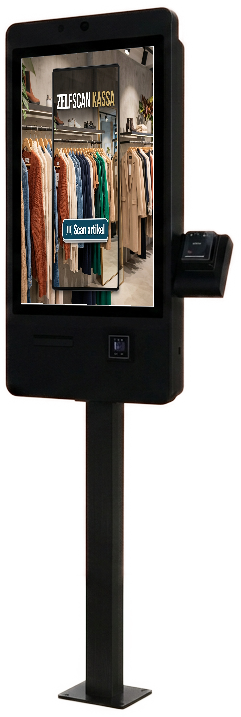
A counter-top model, a free-standing kiosk on a base, a wall model and an outdoor build. Every setup exists in the Premium-line and in the Budget-line, running the same software.
Which line suits my location?
That depends on the surroundings, not on what the kiosk does. With staff nearby the Budget-line gets you far. On an unattended, outdoor or rough location you want the Premium-line.
What does the kiosk need where it stands?
Power and an internet connection, over wifi or a fixed cable. During a visit we look at where the kiosk will stand and how the power and network run there.
Is the card terminal built into the kiosk?
Yes, the card terminal is built in, together with the scanner. Viva.com is our preferred provider for card and online payments, on your own account; another provider is possible on request.
Does the customer get a receipt from the kiosk?
It can: there is a receipt printer in the base. At the same time the order goes to the till and to the kitchen screen, so preparation starts before the customer reaches the counter.
Can someone in a wheelchair operate the kiosk?
Yes. At the foot of the kiosk we fit a joystick at wheelchair height that operates the entire menu, without touching the screen.
Software and integrations
About the screen and the CMS
Which systems does the kiosk connect to?
With Shopify and Shopify POS, WooCommerce, Magento, Salesforce Commerce Cloud and Viva.com. For anything else there is an open API, and where an integration is missing we build it.
Who changes the menu and the prices?
You do, in the CMS. One menu feeds the kiosk, the till and the ordering site, so you enter a price change once and it is right everywhere.
How far does my brand styling go on the screen?
All the way to the buttons. Colours, logo, photography and the tone of the copy are yours, and the housing can be finished in a colour from your brand or in a wood look.
Does the kiosk upsell?
Yes. At every choice the screen suggests a fitting addition, without hurry and without judgement, and that is where the higher order value comes from.
Can one environment run several locations?
Yes. You manage the menu centrally and deviate per location where you need to, on prices, opening hours or a local product.
What can the kiosk do besides ordering?
Check people in, read number plates, rent out and open lockers, drive doors and barriers, start video, and even set a machine in the factory running the moment something is sold.
Pricing and payment
About what it costs
What does an ordering kiosk cost?
Hardware for a Budget-line self-order or standard check-in kiosk leases from EUR 3.50 a day. A software subscription per location comes on top. For the Premium-line and custom builds we write a quote.
Can I buy the kiosk instead?
Yes. Then you own it outright and carry no monthly cost on the hardware. The software subscription runs either way, because that is where the updates and the integrations sit.
What does a surcharge on my card payments mean?
You pay the kiosk back through a surcharge on your card transactions instead of up front. At normal turnover the hardware is paid off in roughly twelve months.
Is the software included in that price?
No, that runs separately as a subscription per location. The existing integrations are included; building a new one is custom work, for which we set a fixed price up front.
Can I try it first?
On selected Budget-line models with standard self-order software you get a free 30 day trial. If it does not suit you, we collect the kiosk again at no cost.
Are the lease instalments deductible?
Yes, the instalments are fully deductible. A lease runs over five years as standard and three years is possible too, at a higher monthly amount.
Delivery and support
About getting it running
How long from agreement to running?
A standard setup with an existing integration is usually in place within a few weeks. A Budget-line kiosk arrives by post and is running within an hour. Custom work with your own flows takes longer; we estimate that after one conversation.
Who installs the kiosk?
For the Premium-line our own engineer does, across Europe, including mounting or anchoring and connecting it. A Budget-line kiosk you place yourself, with instructions supplied.
Do you deliver throughout the Netherlands?
Yes, and beyond that across Europe. The cities on our location pages are where we come most often, not the only places we come.
What if something breaks?
A software fault we handle remotely, usually the same day. If hardware breaks we schedule a visit and make sure you can keep running on your till in the meantime.
Who loads my menu the first time?
We do that together with you during setup: products, prices, photos and the order of the menu. After that you manage it yourself and see a change on the screen straight away.
Can I add a second kiosk later?
Yes. Your menu and settings live in the CMS, not in the kiosk. We connect a new kiosk to the same environment and it shows the same menu the moment it powers on.
Where the answer is set out in full
- Product lines
Premium-line, Budget-line, outdoor and a kiosk in your own interior, side by side on the points that differ.
- Pricing
Where the price comes from, which four parts make up a quote and how buying, leasing and a surcharge on your card payments differ.
- Integrations
Shopify, WooCommerce, Magento, Salesforce Commerce Cloud, Viva.com and the open API, each with what moves between the two.
- Applications
Self-order, retail and webshop, check-in and custom builds: what a kiosk takes over in each of those four roles.
- Locations
Where our kiosks stand and how delivery, installation and service run in your region.
One more question
Is your question missing? Those are the ones we like best
Most questions we get start with something that is not possible as standard. Call us or request a demo and within fifteen minutes you know whether it works for you.
Request a demoOr call us 085 - 0048 321
All contact details